
Mobile power, connected.
The Go Power! Connect app puts your whole power system on your phone. Check battery health, adjust charging, control your inverter charger and review history over Bluetooth®. Free on iOS and Android.



01
System monitoring
Battery voltage, solar charging current, state of charge and power use at a glance. Know what you have before you plug in the coffee maker.
02
Custom alarms
Get notified before a low battery becomes a cold night. Set your own thresholds so the app speaks up when it matters to you.
03
Historical data
See how your system performs day to day and trip to trip. Spot a shaded campsite, a weak panel or a battery that needs attention.
One app for your power system
Solar charge controllers
Bluetooth®-enabled Go Power! | Dometic PWM controllers and Dometic MPPT controllers. View charging data, set your battery type and boost charging before evening.
Advanced Lithium Batteries
See state of charge, voltage and temperature for each battery. Check on your bank from your phone instead of opening the battery compartment.
Advanced Inverter Charger (AIC)
Turn the inverter on or off, adjust charging and inverter settings, and see power use in real time. No trip to the bay required.
PowerTrak™ Display
Your power system on one wall-mounted touchscreen, mirrored in the app. Solar, battery and inverter data in one place.
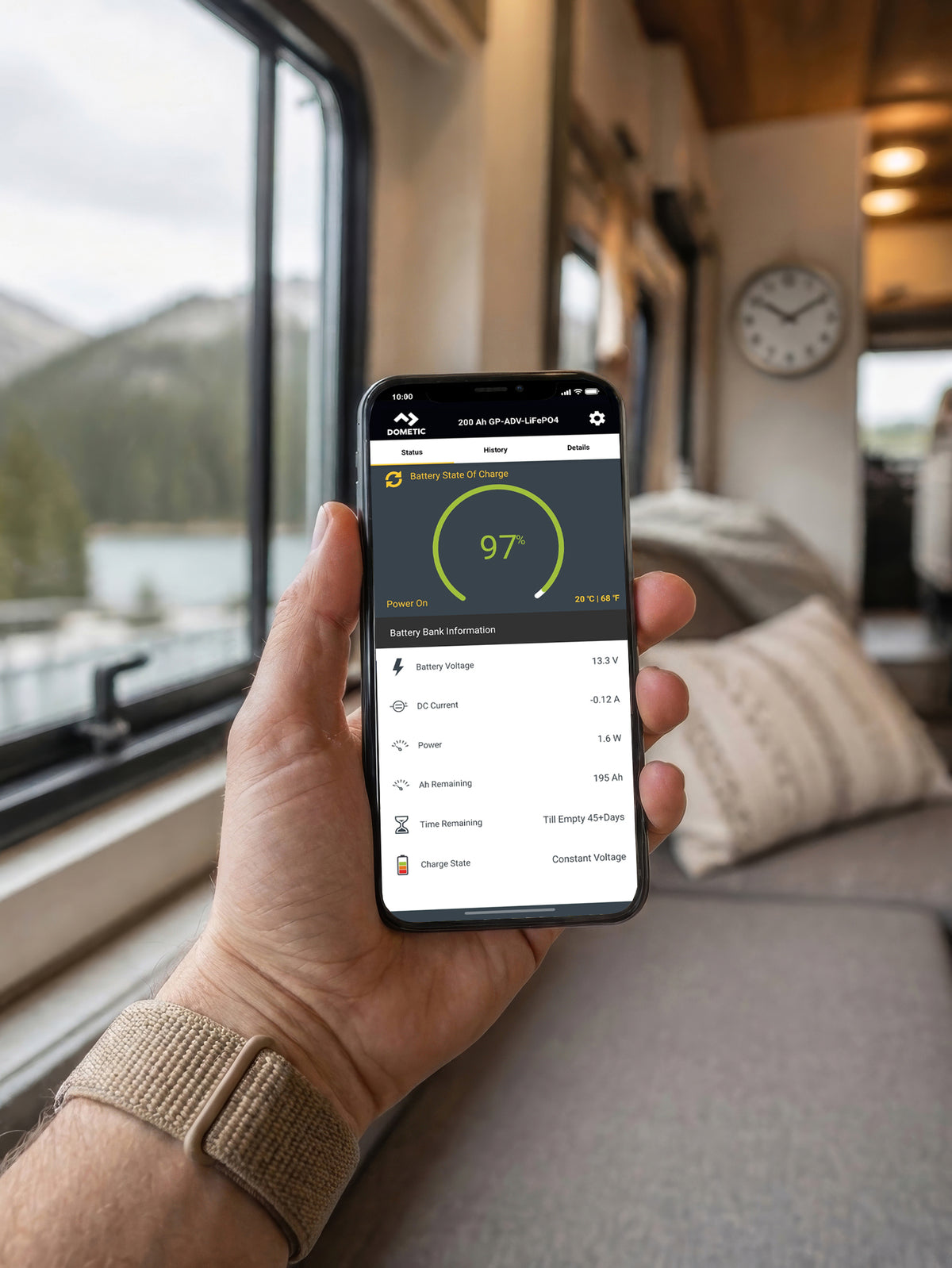
Your whole power system, in your pocket
Pair a Bluetooth®-enabled Go Power! | Dometic device and adjust settings without climbing into the coach.
Battery type & charging profileSealed/Gel, AGM, Flooded & LiFePO4
Battery healthAdvanced Lithium state of charge and temperature
Maximum power boostTop up before evening
Inverter on / offAIC and select ISW inverters
Inverter & charger settingsAdvanced Inverter Charger
PowerTrak™ systemsMonitor & troubleshoot from the app or Display
Inside the app
Find system info, set alarms and view history in a few taps.

Status

History

Details

Settings
Built to connect
Go Power! Connect works best with products designed to talk to each other.
Advanced Lithium Batteries
LiFePO4 power with Bluetooth® built in. Check state of charge and temperature from your phone. A built-in DC heater protects the battery in cold weather. Available in 100Ah and 300Ah.
Shop Lithium BatteriesAdvanced Inverter Charger
Inverter, charger and transfer switch in one compact unit. Turn the inverter on or off and adjust charging from the app. Available in 2000W and 3000W.
Shop Inverter ChargersPowerTrak™ Display
Solar, battery and inverter data on one touchscreen in your RV. Pairs with the app so your phone shows the same view. Included with every AIC Package Kit.
Shop PowerTrak™Get connected in three steps
1
Download the app
Free on the App Store and Google Play. Turn on Bluetooth® on your phone.
2
Pair your device
For solar controllers, press the A and B buttons together for 3 seconds, then select the controller on the Device Selection screen.
3
Name it & go
Give the device a name so the app reconnects automatically next time.
Questions
Is the app free?
Yes. Go Power! Connect is free on the App Store and Google Play. No subscription.
Which products work with Go Power! Connect?
Bluetooth®-enabled Go Power! | Dometic solar controllers such as the GP-PWM-30-UL and GP-SB-PWM-30-BT, Dometic MPPT controllers, Advanced Lithium Batteries, the Advanced Inverter Charger (AIC) and the PowerTrak™ Display.
Does the Advanced Inverter Charger work with the app?
Yes. The AIC has app connectivity built in. You can turn the inverter on or off, set inverter and charging parameters, and watch battery levels and power use in real time.
Which AIC is right for my RV?
The 2000W and 3000W single-leg models suit RVs with 30-amp service. The 3000W dual-leg model suits larger rigs. Not sure? Contact our support team and we'll help you choose.
What can I see from my Advanced Lithium Battery?
State of charge, voltage and battery temperature. If you run more than one battery, you can check each one.
Will Advanced Lithium Batteries work in cold weather?
Yes. A built-in DC heater warms the battery so it can charge safely in cold conditions.
Can I add Advanced Lithium Batteries to my existing system?
Yes. Go Power! | Dometic products are lithium compatible, so you can upgrade your battery bank without replacing your solar or inverter. Contact our team and we'll help you size your bank.
Do I need the PowerTrak™ Display to use the app?
No. Bluetooth®-enabled products connect to the app on their own. The Display adds a touchscreen in your RV and brings all your PowerTrak™ products together on one screen.
What's the difference between the app and the PowerTrak™ Display?
The Display is mounted in your RV and always on. The app gives you the same view on your phone. Most owners use both.
How close do I need to be?
The app connects over Bluetooth® from up to 25 feet away. Inside the RV or at the campsite works well. It won't reach your system from home.
Do I need Wi-Fi or cell service?
No. The app talks to your equipment over Bluetooth®, so it works at remote campsites with no signal.
I don't see my device in Device Selection.
Only paired devices, or devices in pairing mode, appear. For solar controllers, press A and B together for 3 seconds to start pairing. You only need to do this the first time.
The app won't connect.
Make sure your phone is close to the device and Bluetooth® is on. Disconnect from the app when you're done to avoid connection issues next time.
The app connects but shows no data.
Power off the controller for 30 seconds. Then forget the device in your phone's Bluetooth® settings, delete and reinstall the app, and pair again. Still stuck? Call us and we'll walk you through a reset.
Can I change my battery type in the app?
Yes. Choose Sealed/Gel, AGM, Flooded or LiFePO4 so your controller charges your batteries correctly.
How do I disconnect?
Tap the Go Power! | Dometic logo at the top left of the app, then tap Disconnect. The same button is at the bottom of the Status page.
Need a hand?
Monday to Friday, 7:30am to 4:30pm PST | customersupport.gopower@dometic.com